
How I Created A Dynamic Customer Portal in Webflow
Explore the historical Unicorn Factory Webflow portal stack and clarify identity, private data, and public sync ownership.
 Memberstack
 Webflow
Watch: How I Created A Dynamic Customer Portal in Webflow
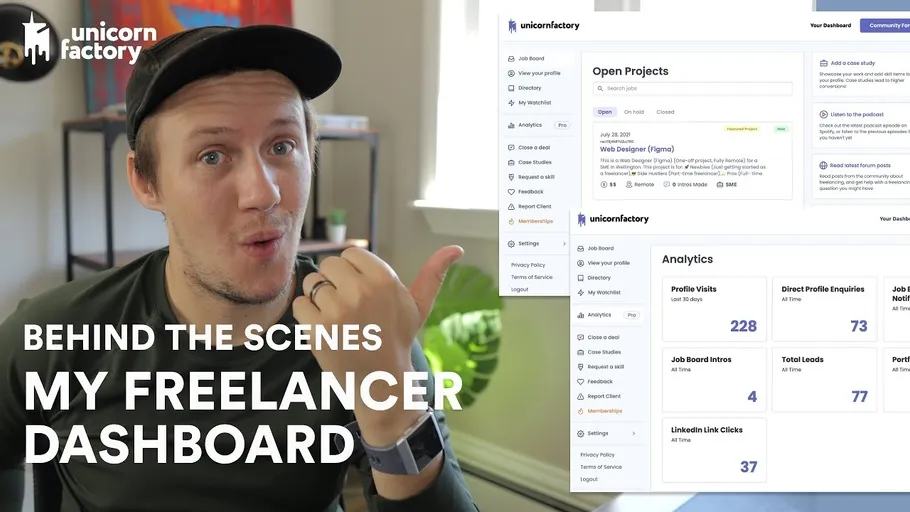
In this video, I take you behind the scenes of the freelancer facing-side of the Unicorn Factory - the freelancer dashboard. I go over the main features like the Job Board, Analytics Dashboard, and the and case studies update functionality, as well as the tools that I used to make it all happen. The freelancer dashboard is created and powered with Webflow, Airtable, Memberstack, Zapier, Jetboost, and Parabola. 🔗 LINKS: https://www.connorfinlayson.com/a/webflow https://www.connorfinlayson.com/a/memberstack https://www.connorfinlayson.com/a/airtable https://www.connorfinlayson.com/a/circle https://www.connorfinlayson.com/a/parabola https://www.connorfinlayson.com/a/mailersend
🕛 TIMESTAMPS: 00:00 Intro 01:00 Job Board 01:44 Analytics Dashboard 03:00 Adding / Updating Case Studies 04:00 Freelancer Watchlist 05:10 How to setup the dashboard in Webflow 08:00 Parabola Freelancer Sync 09:55 Creating multiple dashboard pages 10:50 Starting your own dashboard
Separate the interface, identity, and data
This historical portal used Webflow, Airtable, Memberstack, Zapier, Jetboost, and Parabola. The original tour includes a job board, analytics, case-study updates, and a freelancer watchlist. It describes that stack rather than the current Unicorn Factory architecture.
| Layer | Responsibility |
|---|---|
| Webflow | Page layouts and approved public content |
| Memberstack | Member identity and membership state |
| Airtable | Stored records and external IDs |
| Zapier and Parabola | Defined updates and sync jobs |
| Jetboost | Search and filtering in the interface |
Store the relationship between the member ID and freelancer record explicitly. Authorize private reads and writes against that relationship in a trusted service. Memberstack's visibility attributes do not protect sensitive data already delivered to the browser.
For a case-study update, confirm the signed-in freelancer owns the target record before accepting changed fields. Keep moderation state separate from the draft content. Sync approved fields to the public site. Choose one workflow to own each destination field. Record source IDs so a retry updates the same item.
Test with two freelancer accounts and a logged-out visitor before adding private analytics.
Keep learning
More guides, free videos and course access for existing members, all in one place.
Go to LearnRather have it built for you?
We'll match you with vetted agentic talent who build it with AI, inside the tools you already use.
Schedule a callRelated posts

Build Custom AI Agents for Other Businesses
Scope a custom business agent around one workflow, approved sources, read-only testing, and human review.

How to Build Custom Webflow CMS Features with ChatGPT & AI
I built a weekly calendar for The Running Directory Canada using Webflow CMS content and ChatGPT-assisted JavaScript. The calendar grouped run-club events by weekday and moved today's day to the front.

How to Map Common Airtable Fields to Webflow CMS
Map Airtable values to Webflow CMS types using option IDs, image objects, deterministic rich text, and staged JSON examples.