
A Beginner's Guide To Webhooks
A webhook is a message one service sends to another when an event happens. The receiving service supplies a URL.
 Postman
A webhook is a message one service sends to another when an event happens. The receiving service supplies a URL.
For example, a form service can send a message when someone submits an enquiry. That message can start a workflow without waiting for a scheduled search for new submissions.
Follow one sample event
This illustrative JSON message describes a test enquiry:
{
  "eventId": "test_enquiry_001",
  "type": "enquiry.created",
  "enquiryId": "demo_enquiry_001"
}
The sender makes an HTTP POST to the receiver's URL. The receiver reads the fields and starts its permitted action.
A 200 response usually means the receiver accepted the request. It does not prove every later action succeeded.
Set up a harmless test
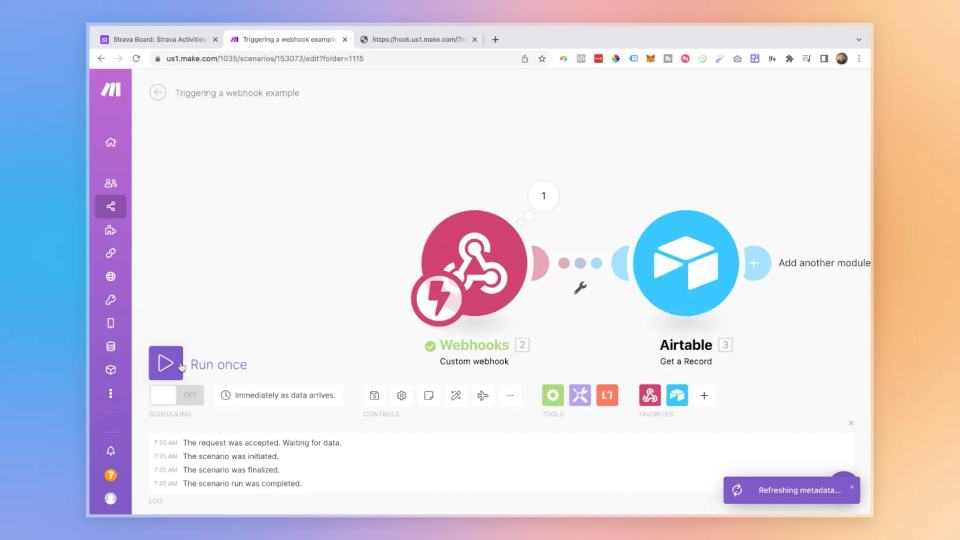
Create a webhook trigger in your automation tool. Send the sample while the receiver listens for test data.
Map enquiryId into a test table. Avoid message, billing, and publication actions during this first test.
Make documents webhook processing, including queues and responses.
Plan for failures and repeats
A timeout or error can cause the sender to retry. Check eventId before creating another enquiry record.
Record processing status so an accepted but unfinished event can be investigated.
Confirm how your sender retries. Different services use different policies.
Keep receiving URLs private and verify signatures when the provider supports them.
The original recording compares webhooks with Zapier's built-in triggers. Use a native trigger when it reliably covers your event. Use a webhook when you need an available event directly.
For a complete next example, trigger Make from Airtable. Test acceptance and completion separately.
When the workflow has several steps, design recovery from interruptions before relying on automatic retries.
Original video
Keep learning
More guides, free videos and course access for existing members, all in one place.
Go to LearnRather have it built for you?
We'll match you with vetted agentic talent who build it with AI, inside the tools you already use.
Schedule a callRelated posts

Build Custom AI Agents for Other Businesses
Scope a custom business agent around one workflow, approved sources, read-only testing, and human review.

Durable workflows: how to stop automations disappearing after a button click
Save business changes and queued work together, then use claims, retries, provider checks, and crash recovery.
Trigger Make Workflows from Airtable with Webhooks
An Airtable automation can send a record ID to Make through a webhook. Make can then retrieve that record and continue the workflow.