
Turn Tella Video Transcripts Into Blog Posts With Claude
Turn a Tella transcript into an article draft while preserving meaning, checking claims, and completing human review.

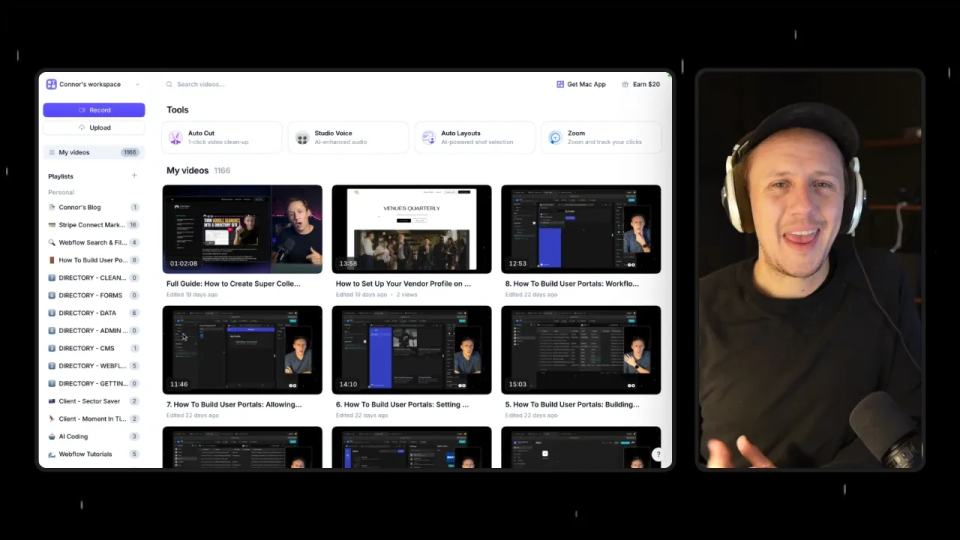
Watch: Turn Tella Video Transcripts Into Blog Posts With Claude
A recorded walkthrough often contains a useful article. The difficult part is turning spoken ideas into a clear structure.
Model Context Protocol (MCP) connects an AI assistant to tools such as Tella.
Tella's MCP server lets a compatible assistant access your videos. It can list videos and request transcript or chapter data when those features are available. Read the official Tella MCP documentation for current client options and setup steps.
This workflow creates a strong first draft. It does not remove editorial review. Check every name, number, product claim, link, and recommendation before publishing.
Watch the tutorial for a visual walkthrough of this transcript-to-draft process.
Prerequisites: Connect Tella to your AI assistant before you start. The Tella MCP setup guide covers current methods. You can also read Part 1: Getting Started with Tella MCP.
1. Connect Tella and confirm access
Tella documents connections for Claude, ChatGPT, Claude Desktop, Claude Code, Cursor, Codex, and other compatible assistants. Your client may expose different menus or capabilities. Follow the current Tella connection instructions for your client.
For Claude, the documented options include its Connector Directory and a custom connector. The custom connector uses this MCP endpoint:
https://api.tella.com/mcp
Claude Desktop also has a documented configuration using mcp-remote. Check Tella's current instructions before copying an older configuration.
The connection uses OAuth 2.1. Your Tella account permissions control which videos the assistant can access. Approve access only for the workspace you intend to use.
Start with a read-only test prompt:
Use Tella to list my five most recent videos.
Return each video's title and ID.
Do not edit, export, delete, or publish anything.
Fix the connection before drafting if this test fails. A generated article cannot compensate for the wrong source.
2. Find the correct video
A request such as "get my last video" depends on the assistant identifying the right record. A title search gives you a stronger check.
Use Tella to find the video titled "[VIDEO TITLE]".
Return its ID, title, duration, and available transcript or chapter data.
Do not create edits or start an export.
If you do not know the exact title, search with a distinctive phrase:
Search my Tella library for videos about "[DISTINCTIVE PHRASE]".
Search titles and transcripts if both are available.
Return the matching titles and IDs.
Tella documents list_videos, search_videos, and get_video for this workflow. Its get_video request can include transcript and chapter data. Exact tool names and controls depend on the client. Confirm the title and ID before drafting.
3. Retrieve the source material
Request the transcript and chapters in a separate message:
Retrieve the Tella video titled "[VIDEO TITLE]".
Include the full transcript and chapters when they are available.
Return the source material without rewriting it.
If the transcript or chapters are missing, say so clearly.
Do not infer missing words or sections.
Chapters can suggest an outline. They do not always make a good article structure. Combine, rename, or remove chapters when the reader needs a clearer sequence.
Tella reports transcript details as unavailable while transcription is processing, failed, or unreadable. A ready clip with no speech can return an empty transcript. Check the video in Tella before treating an empty response as a writing problem.
Add a short brief so the assistant understands the article's purpose:
Audience: [WHO WILL READ THIS]
Reader problem: [WHAT THEY NEED TO SOLVE]
Useful result: [WHAT THEY SHOULD BE ABLE TO DO]
Target length: 1,000 to 1,500 words
Primary topic: [TOPIC]
Required links: [LINKS]
Terms that must stay exact: [NAMES, PRODUCTS, OR CODE]
This context helps the assistant choose relevant details. It also gives you a standard for judging the draft.
4. Generate the blog draft
Use this prompt after confirming the source:
Turn the supplied Tella transcript into a practical blog post in Markdown.

Audience: [WHO WILL READ THIS]
Reader problem: [WHAT THEY NEED TO SOLVE]
Useful result: [WHAT THEY SHOULD BE ABLE TO DO]
Target length: 1,000 to 1,500 words

Requirements:
- Open with the reader's problem and the main lesson.
- Use H2 headings for the main sections.
- Use chapters as an outline only when they fit the reader's task.
- Preserve the speaker's meaning, but remove filler and repeated points.
- Keep product names, commands, paths, prices, and numbers exact.
- Tie factual claims to the transcript or an official linked source.
- List uncertain claims in a separate review table instead of guessing.
- Do not invent personal experience, results, quotes, customer stories, or features.
- Use short paragraphs and concrete examples.
- Add steps or prompts that a reader can apply.
- End with a review checklist and one practical next step.
- Do not call the draft publication-ready.

Link policy:
- Use my supplied Tella affiliate link where relevant, with an appropriate disclosure.
- Include these internal links where they fit: [YOUR RELEVANT ARTICLE LINKS].
- Do not add links that are not supplied or verified.

Return the article only.
The prompt sets boundaries around content and evidence. The review table makes uncertainty visible. Resolve missing evidence before accepting the claim.
If the source jumps between topics, ask for an outline before the article:
Create a proposed outline from this transcript.
For each section, list the source passages it uses and the reader question it answers.
Do not draft the article yet.
Review that outline before requesting the article.
5. Review the draft against the transcript
Treat the generated article as an editorial draft. Read it beside the transcript and check each important claim. Use this audit prompt:
Audit this blog draft against the supplied transcript.
Return a table with these columns:
claim | transcript evidence | official source needed | action

Check for:
- incorrect names, numbers, dates, or product terms
- claims that the transcript does not support
- features that may have changed
- repeated ideas and weak transitions
- instructions that omit a required step
- affiliate links and internal links
- promises about speed, savings, reliability, or results

List missing evidence in the review table. Do not repair gaps by guessing.
Then complete these checks yourself:
- Confirm the draft uses the intended video and accurate terms.
- Remove unsupported numbers, results, and product claims.
- Test important links and check the media embed.
- Remove personal stories that the source did not provide.
- Check that the opening, headings, and conclusion serve the reader.
- Complete a human style and fact review before publishing.
A transcript can contain errors. Spoken confidence does not make a claim true. Show uncertainty when the source is uncertain.
Troubleshooting
The assistant asks me to connect again
Open Tella's connection settings and complete authorization. Confirm that the account belongs to the intended workspace. Tella documents OAuth 2.1 and applies your account permissions.
If the connection fails again, remove the stale connection and follow the current setup guide. Do not paste API keys into a chat.
The assistant cannot find the video
Ask for recent videos, then search by title or a distinctive phrase. Confirm the returned ID before requesting the transcript. Check that the video belongs to the connected workspace.
The transcript is missing
Tella can report unavailable transcript details while processing, after a failure, or when the transcript cannot be read. Retry after the video reports a ready transcript. An empty transcript can be correct for a clip with no speech.
Names or product terms are wrong
Correct the draft against the recording and official product documentation. Tella documents a Transcript Dictionary for recurring terms in English transcriptions. Confirm unusual terms before changing them.
The assistant proposes an edit or publish action
Stop and review the proposed action. This workflow uses retrieval and drafting. Keep write actions separate until the article passes human review.
Next step
Choose one Tella recording and run the read-only retrieval prompts. Compare the outline with the transcript before generating the article. Then edit the draft until each section helps the reader complete a real task.
The process gives you a repeatable starting point. Quality still depends on the source, the prompt, and your review.
Resources
- Tella MCP documentation
- Tella transcript editing guide
- Anthropic MCP documentation
- Claude Desktop download
Tools mentioned
Disclosure: This section contains a Tella affiliate link. Purchases through it may earn me a commission.
Keep a simple transformation faithful
Here is an illustrative spoken passage, not a recovered quote from the tutorial:
I keep the original submission, then I review it, and only approved fields go to the public profile.
A written version can be:
Store the original submission separately. Review the changed fields before syncing approved content to the public profile.
The edit removes spoken repetition while retaining the approval boundary. It does not add a result, product feature, or personal story. When your real transcript lacks a step, ask for clarification instead of filling it with a plausible instruction.
Keep learning
More guides, free videos and course access for existing members, all in one place.
Go to LearnRather have it built for you?
We'll match you with vetted agentic talent who build it with AI, inside the tools you already use.
Schedule a callRelated posts
Use the Tella Video API for Library Sync and Blog Drafts
Use Tella API pagination and playlist events for a library sync or reviewed blog draft, with duplicate and readiness checks.

Circle AI Agents Review: Automate Community Management with AI
Read my Circle AI Agent tests, current plan notes, and a support-demand method for evaluating cost and answer quality.

Build Custom AI Agents for Other Businesses
Scope a custom business agent around one workflow, approved sources, read-only testing, and human review.